3. Usage Reference

As ACCS is completely integrated within ANSYS Workbench, one simply needs to run Workbench to have access to it. For step-by-step tutorials, please refer to the Workshops section.

3.1. Workflow

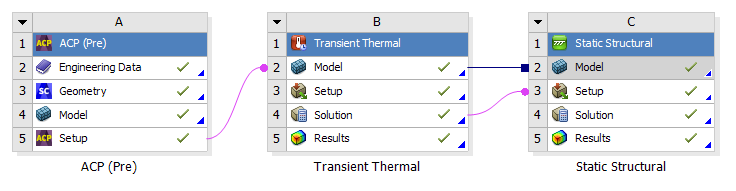
A typical Workbench ACCS workflow for composite structures looks as follows:

_images/workflow1.png

Fig. 3.1 Typical cure simulation workflow for composites in Workbench.

The material properties are defined in the Engineering Data module. A shell model is generated in DesignModeler or in SpaceClaim or in any other CAD tool, then it is worked out in ACP (Pre) module to build a solid finite element model of the composite structure that will be transferred to the “Transient Thermal” module where the temperature distribution will be computed throughout the cure cycle for every element as well as the degree of cure, the state of the material, the glass transition temperature and the instantaneous heat of reaction. The temperature distribution is then transferred to the “Static Structural” module where the distortions will be computed using the previously computed temperature and the material properties.

3.2. Material Definition

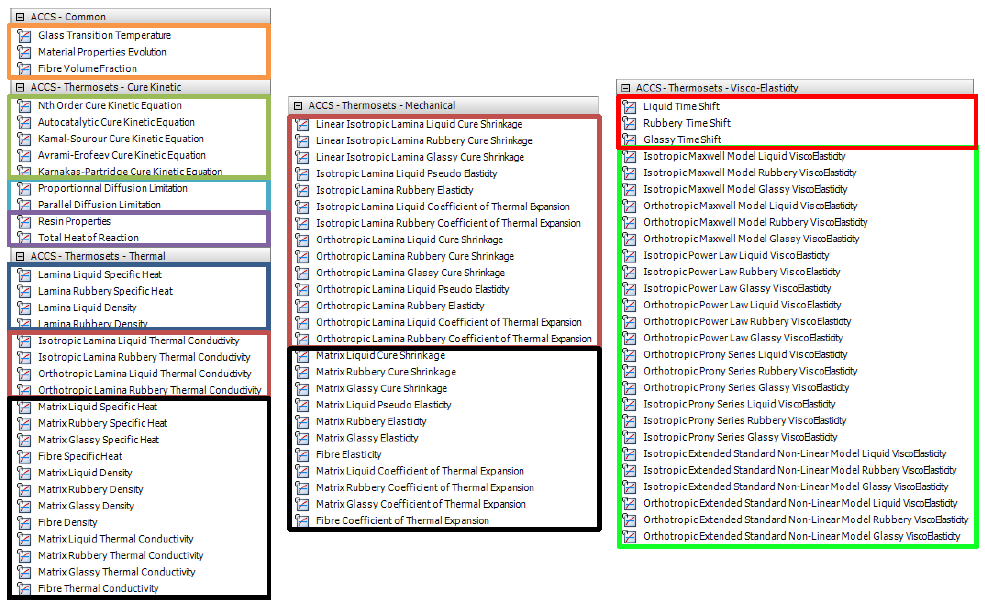
The first task in the modeling of the cure process with ACCS is to correctly define the material properties. In the list of Materials (Fig. 3.2), the basic material properties that the user should start with are the Thermoset - Cure Kinetics Model [first five Properties ended with “Equation”]. The Resin properties, Total Heat of Reaction and the ACCS Common properties will be included automatically. The user can then include a diffusion limitation formulation (Proportional Diffusion Limitation or Parallel Diffusion Limitation). Now the user must choose one of the two ways to define the ply material. The first one is defining the ply material using separate fiber and matrix properties, which in this case all the properties enclosed by a black rectangle must be included (adding one will include the other relevant properties). The second way is to define the ply material using homogenized lamina properties. In this case the Isotropic or Orthotropic properties must be included (adding one will also include the other relevant properties). All the first four properties of the “ACCS-Thermoset-Thermal” list will also be included automatically. Optionally, the user may want to include visco-elastic effects. To do so, the user can include one of the available models in its Isotropic or Orthotropic formulation (in light green). Adding one will include the other relevant properties. Including the “Liquid Time Shift”, “Rubbery Time Shift” and “Glassy Time Shift” properties will allow to take into effect temperature and/or degree of cure time shifts.

_images/Materials.png

Fig. 3.2 List of material properties specific for Thermosets showed in the Engineering Data

_images/Themoplastic_properties.png

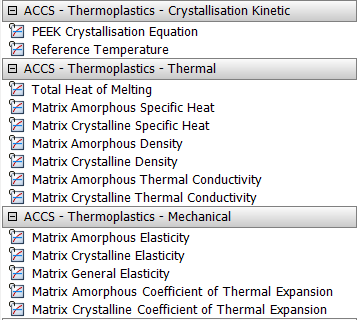
Fig. 3.3 List of material properties specific for Thermoplastics showed in the Engineering Data

For the PEEK Crystallization model, the user has to introduce all of the thermoplastics properties and all of the fibre properties. When the PEEK Crystallization Model is introduced in the Engineering Data, all the rest of the thermoplastic material properties (Thermal and Mechanical) will be automatically included into the material definition. For more detail about this crystallization model, please refer to its section in the theory documentation.

Note

The automatic inclusion of properties is only available for Engineering Data cells connected to an “ACP (Pre)” module, an ANSYS thermal module or an ANSYS structural module.

Warning

When opening in ANSYS 2022 R1 a project which was created with an earlier release of ACCS, the material properties must be updated. Simply click on the button ACCSupgrade.

Note

If in Engineering Data, the materials were introduced using the fibre/matrix formulation, the user can add equivalent glassy properties to fix some issues. Simply click on the button ACCSfm.

3.3. Adding the Cure Simulation Equations

The ACCS solution is also integrated within Mechanical and is therefore available in the Transient Thermal and Static Structural analysis systems in the form of an additional tab in the ribbon as show in the figure below.

_images/accs_features_2.png

Fig. 3.4 ACCS features in the Mechanical menu ribbon.

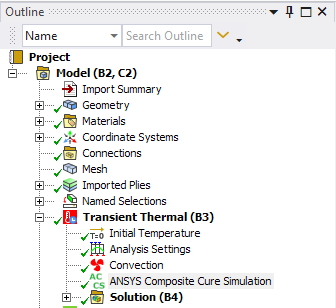
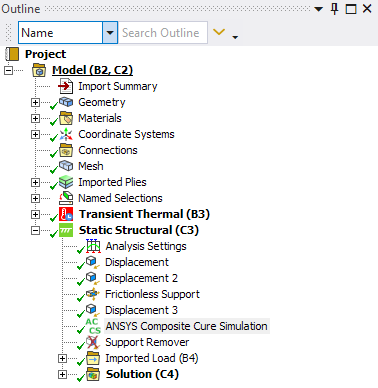
Adding ACCS to the analysis invokes the ANSYS solver with chemical cure and cure shrinkage routines for materials with defined cure kinetics properties within the Engineering Data module. Once in Workbench Mechanical the user can initiate ACCS by clicking on the “Add Cure Simulation” ACCSadd button as shown in the figures below for the Transient Thermal and Static Structural modules.

_images/initiating_accs1.png
_images/initiating_accs2.png

Fig. 3.5 Initiating ACCS from the toolbar adds an “ANSYS Composite Cure Simulation” item to the current analysis.

3.4. Analysis Settings

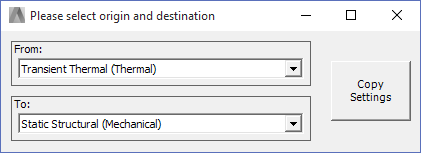
When performing a Full Cure Simulation, the button “Copy Analysis Settings” ACCScopy allows the user to copy relevant analysis settings between two analyses easy and fast.

_images/copy_AS.png

Fig. 3.6 This pop up window appears when selecting the “copy Analysis Settings” feature.

3.5. Support Remover

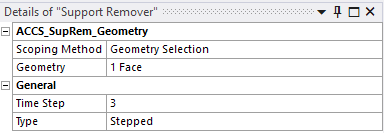
The lamination process usually involves the placing of composite layers over a mold. After the curing cycle is finished, the part is taken off the mold. Is in this phase of the process where the most relevant permanent deformations occur since the part is without the form constrictions. To simulate that step, ACCS has a boundary condition called “Support Remover” ACCSsupportremover which delete every node that is scoped to it from it predefined displacement constraint. It is important to remark that the support remover is only needed for frictionless supports because you cannot enable/disable it per load step as other supports do.

_images/details_support_remover.png

Fig. 3.7 Details of the Support Remover option

3.6. Post-Processing Options

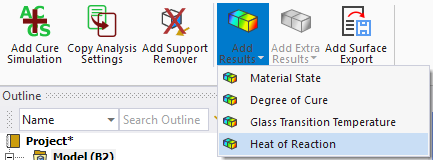
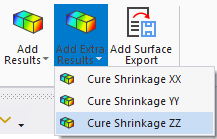
Including the ACCS feature into the analysis opens the possibility to add cure simulation specific post-processing options like Material State, Degree of Cure, Glass Transition Temperature and Cure Shrinkage in all cartesian directions. These options can be found by selecting the “Add Results” and the “Add Extra Results” buttons, as shown in the following image:

_images/Results_available.png

Fig. 3.8 Results available during both the Thermal and Mechanical analyses.

3.6.1. Material State

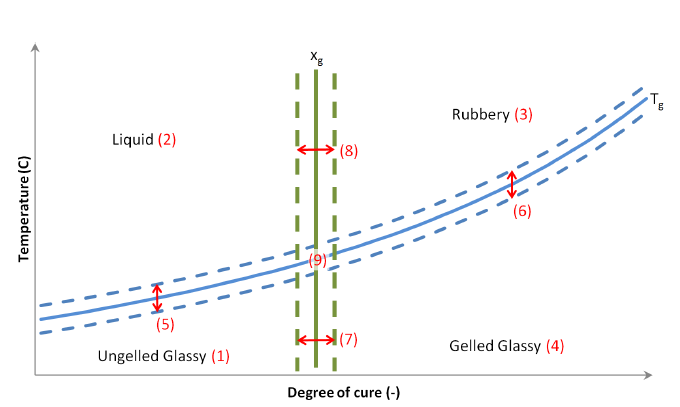
There are two main transitions that can be distinguished during the curing process of a thermosetting resin. The first one is gelation and the second one is vitrification occurring when the material Tg reaches the cure temperature

_images/Temp_vs_DoC_thermosets.png

Fig. 3.9 Plot of an empirical curve (blue) and a simplified curve (red dots) used by ACCS to describe the different material states.

3.6.2. Degree of Cure

This result shows the develope of the curing reaction in the material domain. See Fig. 4.1 to see a the dependence of the degree of cure and the temperature in time.

3.6.3. Glass Transition Temperature

This result characterizes the range of temperatures over chich the glass transition occurs.

3.6.4. Heat of Reaction

The Heat of Reaction is shown in the Thermoset domain and the plot shows the evolution of it in the time window.

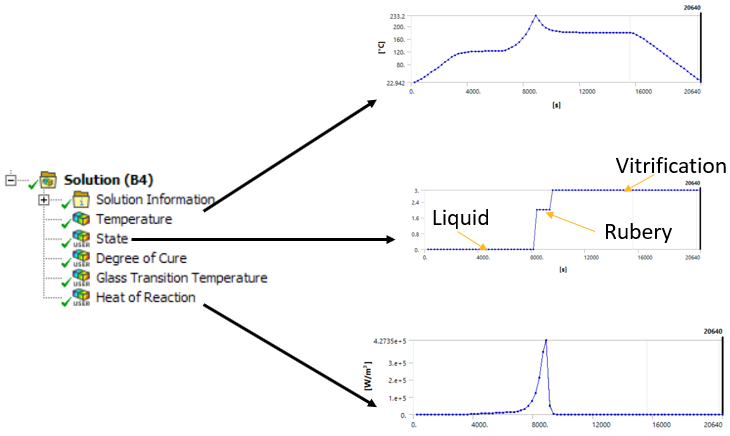
Once the model is solved, the results can be reviewed by clicking on them. Here in the example, an exothermic reaction can be seen in the temperature profile. In many cases, the exothermic reaction a risk to the process. Excessive heat can cause inhomogeneous cure (check the Degree of Cure result) and can damage the structural materials (mainly the resin itself, but also polymeric sandwich cores; or heat-sensitive fibers, such as natural fibers), as well as the auxiliary materials (e.g. the vacuum bag).

_images/solution_plots.PNG

Fig. 3.10 Solution plots example. Exotherms and material states can be post processed from thermal simulation.

_images/Mechanical_results.png

Fig. 3.11 Extra results only available during the Mechanical analysis.

3.7. Export Compensated Geometry

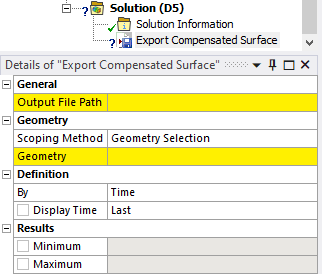
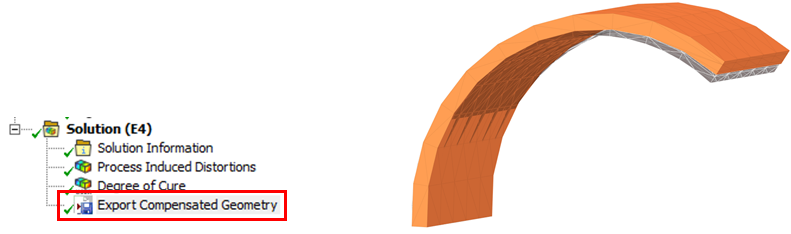
The export compensated geometry button ACCSexport_feature adds an object which automatically compensates the process induced distortions for the selected faces. The process induced distortions (deformations) of the structural simulation are inverted and added to the nominal geometry. The compensated geometry can be exported as STL, RSO or point cloud. The options of the support remover are:

  • Output File Path: the file path where the file will be saved

  • Scoping Method and Geometry: the geometrical entities which will be exported

_images/export_feature_2.png

Fig. 3.12 Options of the compensated surface export item.

_images/Compensated_geometry.png

Fig. 3.13 Compensated geometry (orange) and nominal shape (grey).

3.8. Scripting

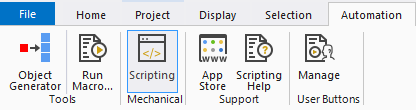
The automatization suite of Mechanical also supports the scripting of the ACCS extension. The example below shows how the ACCS extension and module can be loaded into the scripting environment. Once loaded, the ACCS module can be used to activate the curing simulation, control the properties, add a support remover, add results plots etc.

_images/menu_scripting.png

Fig. 3.14 Mechanical’s Automation tab.

An alternative is to use the recording to generate the script automatically.

_images/recording_script.png

Fig. 3.15 Recording button translates the GUI actions into a script.

The following examples are available at the following location:

%ProgramFiles%/LMAT/ACCS/v2.5_WB22.1/ScriptingDemo/

3.8.1. Full cure simulation

This example shows how a full cure simulation with a transient thermal and structural analysis can be defined via scripting. The first script (wbjn) adds the material to the WB project and the analysis systems, the second script (Python) is for Mechanical to add, configure, run, and post-process the cure simulation within Mechanical.

Download files here

Workbench journal script

**Show/Hide Code**
 1# encoding: utf-8
 2
 3Reset()
 4
 5import os
 6import re
 7
 8directory = os.path.dirname(os.path.abspath(__file__))
 9cdb = os.path.join(directory,"C-shape.cdb")
10script = os.path.join(directory,"test_scripting_full.py")
11
12
13import ACCS_scripting
14
15
16# Instantiating the project interface
17ACCS_proj = ACCS_scripting.Project()
18
19
20
21EngD_sys = GetTemplate(TemplateName="EngData").CreateSystem()
22EngD_EngD = EngD_sys.GetContainer(ComponentName="Engineering Data")
23for m in EngD_EngD.GetMaterials():
24   m.Delete()
25EngD_fav = EngData.LoadFavoriteItems()
26EngD_lib = EngData.OpenLibrary(Name="Cure Simulation",Source="ACCS_Library.xml")
27AS4 = EngD_EngD.ImportMaterial(Name="UD epoxy prepreg",Source="ACCS_Library.xml")
28AS4.SetAsDefaultSolidForModel()
29AS4.SetAsDefaultFluidForModel()
30EngD_engd = EngD_sys.GetComponent(Name="Engineering Data")
31
32
33FEM_sys = GetTemplate(TemplateName="External Model").CreateSystem(Position="Below",RelativeTo=EngD_sys)
34FEM_sys.GetContainer(ComponentName="Setup").AddDataFile(FilePath=cdb)
35FEM_setup = FEM_sys.GetComponent(Name="Setup")
36FEM_setup.Update(AllDependencies=True)
37
38
39
40MaterialReleases = ACCS_proj.CheckMaterial()
41if MaterialReleases!=None:
42   print("Materials need to be updated")
43   ACCS_proj.UpgradeMaterial()
44
45
46ACCS_proj.HomogeneizeMaterial()
47
48
49
50Th_tpl = GetTemplate(TemplateName="Transient Thermal",Solver="ANSYS")
51Full_Th_sys = Th_tpl.CreateSystem(Position="Right",RelativeTo=FEM_sys)
52Full_Th_sys.DisplayText = "Full - Transient Thermal"
53Full_Th_engd = Full_Th_sys.GetComponent(Name="Engineering Data")
54Full_Th_model = Full_Th_sys.GetComponent(Name="Model")
55Full_Th_setup = Full_Th_sys.GetContainer(ComponentName="Setup")
56Full_Th_solution = Full_Th_sys.GetComponent(Name="Solution")
57
58Full_Th_engd.ReplaceWithShare(TargetSystem=Full_Th_sys,ComponentToShare=EngD_engd,SourceSystem=EngD_sys)
59FEM_setup.TransferData(TargetComponent=Full_Th_model)
60
61
62Transfer_tpl = GetComponentTemplate(Name="SimulationSetupCellTemplate_StructuralStaticANSYS")
63St_tpl = GetTemplate(TemplateName="Static Structural",Solver="ANSYS")
64Full_St_sys = St_tpl.CreateSystem(
65   ComponentsToShare=[Full_Th_engd, Full_Th_model],
66   DataTransferFrom=[Set(FromComponent=Full_Th_solution, TransferName=None, ToComponentTemplate=Transfer_tpl)],
67   Position="Right",
68   RelativeTo=Full_Th_sys)
69Full_St_sys.DisplayText = "Full - Static Structural"
70Full_St_setup = Full_Th_sys.GetContainer(ComponentName="Setup")
71
72
73Full_Th_model.Update(AllDependencies=True)
74
75
76Full_St_setup.Edit()
77Full_St_setup.SendCommand(Command="WB.AppletList.Applet('DSApplet').App.Script.doToolsRunMacro(\""+re.escape(script)+"\")")
Mechanical journal script

**Show/Hide Code**
  1# encoding: utf-8
  2
  3import os
  4
  5directory = os.path.dirname(os.path.abspath(__file__))
  6RSO = os.path.join(directory,"C-shape.rso")
  7
  8
  9import ACCS_scripting
 10
 11
 12# Instantiating the mechanical interface
 13ACCS_mech = ACCS_scripting.Mechanical(ExtAPI)
 14
 15
 16LoadSteps = [15600, 20400, 20640]
 17CureCycle = [  [    0., 20.],
 18               [ 3000.,120.],
 19               [ 6600.,120.],
 20               [ 8400.,180.],
 21               [15600.,180.],
 22               [20400., 20.],
 23               [23000., 20.]]
 24
 25
 26part = Model.Geometry.Children[0]
 27body = part.Children[0]
 28geoBody = body.GetGeoBody()
 29
 30
 31#Adding Named Selection: Body
 32NS_body = Model.AddNamedSelection()
 33NS_body.Name = r"Body"
 34NS_body.ScopingMethod = GeometryDefineByType.Worksheet
 35NS_body.GenerationCriteria.Add(None)
 36NS_body.GenerationCriteria[0].Action = SelectionActionType.Add
 37NS_body.GenerationCriteria[0].EntityType = SelectionType.GeoBody
 38NS_body.GenerationCriteria[0].Criterion = SelectionCriterionType.Size
 39NS_body.GenerationCriteria[0].Operator = SelectionOperatorType.Largest
 40NS_body.Generate()
 41
 42#Adding Named Selection: Outer
 43NS_outer = Model.AddNamedSelection()
 44NS_outer.Name = r"Outer"
 45NS_outer.ScopingMethod = GeometryDefineByType.Worksheet
 46NS_outer.GenerationCriteria.Add(None)
 47NS_outer.GenerationCriteria[0].Action = SelectionActionType.Add
 48NS_outer.GenerationCriteria[0].EntityType = SelectionType.GeoFace
 49NS_outer.GenerationCriteria[0].Criterion = SelectionCriterionType.Size
 50NS_outer.GenerationCriteria[0].Operator = SelectionOperatorType.Largest
 51NS_outer.Generate()
 52
 53#Adding Named Selection: Inner
 54NS_inner = Model.AddNamedSelection()
 55NS_inner.Name = r"Inner"
 56NS_inner.ScopingMethod = GeometryDefineByType.Worksheet
 57NS_inner.GenerationCriteria.Add(None)
 58NS_inner.GenerationCriteria[0].Action = SelectionActionType.Add
 59NS_inner.GenerationCriteria[0].EntityType = SelectionType.GeoFace
 60NS_inner.GenerationCriteria[0].Criterion = SelectionCriterionType.Size
 61NS_inner.GenerationCriteria[0].Operator = SelectionOperatorType.RangeInclude
 62NS_inner.GenerationCriteria[0].LowerBound = Quantity(0.001, 'm m')
 63NS_inner.GenerationCriteria[0].UpperBound = Quantity(0.0015, 'm m')
 64NS_inner.Generate()
 65
 66#Adding Named Selection: Edge
 67NS_edge = Model.AddNamedSelection()
 68NS_edge.Name = r"Edge"
 69NS_edge.ScopingMethod = GeometryDefineByType.Worksheet
 70NS_edge.GenerationCriteria.Add(None)
 71NS_edge.GenerationCriteria[0].Action = SelectionActionType.Add
 72NS_edge.GenerationCriteria[0].EntityType = SelectionType.GeoEdge
 73NS_edge.GenerationCriteria[0].Criterion = SelectionCriterionType.LocationZ
 74NS_edge.GenerationCriteria[0].Operator = SelectionOperatorType.LessThan
 75NS_edge.GenerationCriteria[0].Value = Quantity(0.001, 'm')
 76NS_edge.GenerationCriteria.Add(None)
 77NS_edge.GenerationCriteria[1].Action = SelectionActionType.Filter
 78NS_edge.GenerationCriteria[1].EntityType = SelectionType.GeoEdge
 79NS_edge.GenerationCriteria[1].Criterion = SelectionCriterionType.Size
 80NS_edge.GenerationCriteria[1].Operator = SelectionOperatorType.RangeInclude
 81NS_edge.GenerationCriteria[1].LowerBound = Quantity(0.05, 'm')
 82NS_edge.GenerationCriteria[1].UpperBound = Quantity(0.06, 'm')
 83NS_edge.Generate()
 84
 85#Adding Named Selection: DX
 86NS_DX = Model.AddNamedSelection()
 87NS_DX.Name = r"DX"
 88NS_DX.ScopingMethod = GeometryDefineByType.Worksheet
 89NS_DX.GenerationCriteria.Add(None)
 90NS_DX.GenerationCriteria[0].Action = SelectionActionType.Add
 91NS_DX.GenerationCriteria[0].EntityType = SelectionType.GeoVertex
 92NS_DX.GenerationCriteria[0].Criterion = SelectionCriterionType.LocationX
 93NS_DX.GenerationCriteria[0].Operator = SelectionOperatorType.Smallest
 94NS_DX.GenerationCriteria.Add(None)
 95NS_DX.GenerationCriteria[1].Action = SelectionActionType.Filter
 96NS_DX.GenerationCriteria[1].EntityType = SelectionType.GeoVertex
 97NS_DX.GenerationCriteria[1].Criterion = SelectionCriterionType.LocationZ
 98NS_DX.GenerationCriteria[1].Operator = SelectionOperatorType.Smallest
 99NS_DX.Generate()
100
101#Adding Named Selection: DY
102NS_DY = Model.AddNamedSelection()
103NS_DY.Name = r"DY"
104NS_DY.ScopingMethod = GeometryDefineByType.Worksheet
105NS_DY.GenerationCriteria.Add(None)
106NS_DY.GenerationCriteria[0].Action = SelectionActionType.Add
107NS_DY.GenerationCriteria[0].EntityType = SelectionType.GeoFace
108NS_DY.GenerationCriteria[0].Criterion = SelectionCriterionType.Size
109NS_DY.GenerationCriteria[0].Operator = SelectionOperatorType.Smallest
110NS_DY.GenerationCriteria.Add(None)
111NS_DY.GenerationCriteria[1].Action = SelectionActionType.Filter
112NS_DY.GenerationCriteria[1].EntityType = SelectionType.GeoFace
113NS_DY.GenerationCriteria[1].Criterion = SelectionCriterionType.LocationX
114NS_DY.GenerationCriteria[1].Operator = SelectionOperatorType.LessThan
115NS_DY.GenerationCriteria[1].Value = Quantity(0.005, 'm')
116NS_DY.Generate()
117
118#Adding Named Selection: DZ
119NS_DZ = Model.AddNamedSelection()
120NS_DZ.Name = r"DZ"
121NS_DZ.ScopingMethod = GeometryDefineByType.Worksheet
122NS_DZ.GenerationCriteria.Add(None)
123NS_DZ.GenerationCriteria[0].Action = SelectionActionType.Add
124NS_DZ.GenerationCriteria[0].EntityType = SelectionType.GeoFace
125NS_DZ.GenerationCriteria[0].Criterion = SelectionCriterionType.LocationZ
126NS_DZ.GenerationCriteria[0].Operator = SelectionOperatorType.Smallest
127NS_DZ.Generate()
128
129
130#Adding element orientation
131EO = Model.Geometry.AddElementOrientation()
132EO.BodyLocation = NS_body
133EO.SurfaceLocation = NS_inner
134EO.EdgeLocation = NS_edge
135EO.AxisEdgeOrientation = EO.AxisEdgeOrientation.NegativeXAxis
136
137
138
139
140###############################################################
141#
142#              THERMAL ANALYSIS
143#
144###############################################################
145
146TH_analysis = Model.Analyses[0]
147TH_solution = TH_analysis.Solution
148
149
150TH_analysis.InitialConditions[0].InitialTemperatureValue = Quantity(20,'C')
151
152
153AS = TH_analysis.AnalysisSettings
154AS.NumberOfSteps = len(LoadSteps)
155for CSN in range(len(LoadSteps),0,-1):
156   AS.SetStepEndTime(CSN, Quantity(LoadSteps[CSN-1], "sec"))
157   AS.SetAutomaticTimeStepping(CSN, AutomaticTimeStepping.On)
158   AS.SetCarryOverTimeStep(CSN, AutomaticTimeStepping.On)
159   AS.SetInitialTimeStep(CSN, Quantity(120, "sec"))
160   AS.SetMinimumTimeStep(CSN, Quantity( 60, "sec"))
161   AS.SetMaximumTimeStep(CSN, Quantity(240, "sec"))
162
163
164conv = TH_analysis.AddConvection()
165conv.Location = NS_inner
166conv.FilmCoefficient.Output.DiscreteValues = [Quantity(10, "W m^-1 m^-1 C^-1")]
167conv.AmbientTemperature.Inputs[0].DiscreteValues = [Quantity(t[0], "s") for t in CureCycle]
168conv.AmbientTemperature.Output.DiscreteValues = [Quantity(t[1], "C") for t in CureCycle]
169
170
171TH_ACCS_ld = ACCS_mech.AddACCS(TH_analysis)
172
173
174TH_temp = TH_solution.AddTemperature()
175
176TH_ACCS_res_state = ACCS_mech.AddResultState(TH_analysis)
177TH_ACCS_res_alpha = ACCS_mech.AddResultAlpha(TH_analysis)
178TH_ACCS_res_Tg = ACCS_mech.AddResultTg(TH_analysis)
179TH_ACCS_res_qdot = ACCS_mech.AddResultHeat(TH_analysis)
180
181
182TH_solution.Solve(True)
183
184
185
186
187###############################################################
188#
189#              STRUCTURAL ANALYSIS
190#
191###############################################################
192
193ST_analysis = Model.Analyses[1]
194ST_solution = ST_analysis.Solution
195
196
197ACCS_mech.CopyAnalysisSettings(TH_analysis, ST_analysis)
198
199
200ST_importedload = ST_analysis.GetChildren(DataModelObjectCategory.ImportedBodyTemperature, True)[0]
201ST_importedload.PropertyByName('PROPID_AnalysisTimeDefinition').InternalValue = 0
202
203
204ST_frictionless = ST_analysis.AddFrictionlessSupport()
205ST_frictionless.Location = NS_inner
206
207ST_DX = ST_analysis.AddDisplacement()
208ST_DX.Location = NS_DX
209ST_DX.PropertyByName('ComponentX').InternalValue = 0
210for CSN in range(0,len(LoadSteps)-1,+1):
211   ST_DX.SetActivateAtLoadStep(CSN+1,False)
212for CSN in range(len(LoadSteps)-1,len(LoadSteps),+1):
213   ST_DX.SetActivateAtLoadStep(CSN+1,True)
214ST_DX.Name = NS_DX.Name
215
216
217ST_DY = ST_analysis.AddDisplacement()
218ST_DY.Location = NS_DY
219ST_DY.PropertyByName('ComponentY').InternalValue = 0
220ST_DY.Name = NS_DY.Name
221
222ST_DZ = ST_analysis.AddDisplacement()
223ST_DZ.Location = NS_DZ
224ST_DZ.PropertyByName('ComponentZ').InternalValue = 0
225ST_DZ.Name = NS_DZ.Name
226
227
228ST_ACCS_ld = ACCS_mech.AddACCS(ST_analysis)
229ST_ACCS_ld.setAnalysisType('Full')
230ST_ACCS_ld.setViscoElasticity('Disabled')
231
232
233ST_ACCS_suprem = ACCS_mech.AddSupportRemover(ST_analysis)
234ST_ACCS_suprem.setSurfacesByNamedSelection(NS_inner)
235ST_ACCS_suprem.setStep(str(len(LoadSteps)))
236
237
238ST_ACCS_surexp = ACCS_mech.AddSurfaceExporter(ST_analysis)
239ST_ACCS_surexp.setSurfacesByNamedSelection(NS_outer)
240ST_ACCS_surexp.setExportPath(RSO)
241
242
243ST_TOTDEF = ST_solution.AddTotalDeformation()
244
245ST_EPTHXX = ST_solution.AddThermalStrain()
246ST_EPTHXX.NormalOrientation = NormalOrientationType.XAxis
247ST_EPTHXX.Name = 'EPTHXX'
248
249ST_EPTHYY = ST_solution.AddThermalStrain()
250ST_EPTHYY.NormalOrientation = NormalOrientationType.YAxis
251ST_EPTHYY.Name = 'EPTHYY'
252
253ST_EPTHZZ = ST_solution.AddThermalStrain()
254ST_EPTHZZ.NormalOrientation = NormalOrientationType.ZAxis
255ST_EPTHZZ.Name = 'EPTHZZ'
256
257ST_ACCS_res_state = ACCS_mech.AddResultState(ST_analysis)
258ST_ACCS_res_alpha = ACCS_mech.AddResultAlpha(ST_analysis)
259ST_ACCS_res_Tg = ACCS_mech.AddResultTg(ST_analysis)
260ST_ACCS_res_qdot = ACCS_mech.AddResultHeat(ST_analysis)
261
262
263
264ST_solution.Solve(wait=True)
265

3.8.2. Fast cure simulation via MRCC

This example shows how a fast cure simulation with a three-step structural analysis can be defined via scripting. The first script (wbjn) adds the material to the WB project and the analysis system, the second script (Python) is for Mechanical to add, configure, run, and post-process the cure simulation within Mechanical. The cure cycle is defined by the manufacturer recommended cure-cycle (heat rate, and dwell times).

Download files here

Workbench journal script

**Show/Hide Code**
 1# encoding: utf-8
 2
 3Reset()
 4
 5import os
 6import re
 7
 8directory = os.path.dirname(os.path.abspath(__file__))
 9cdb = os.path.join(directory,"C-shape.cdb")
10script = os.path.join(directory,"test_scripting_fast_MRCC.py")
11
12
13import ACCS_scripting
14
15
16# Instantiating the project interface
17ACCS_proj = ACCS_scripting.Project()
18
19
20
21EngD_sys = GetTemplate(TemplateName="EngData").CreateSystem()
22EngD_EngD = EngD_sys.GetContainer(ComponentName="Engineering Data")
23for m in EngD_EngD.GetMaterials():
24   m.Delete()
25EngD_fav = EngData.LoadFavoriteItems()
26EngD_lib = EngData.OpenLibrary(Name="Cure Simulation",Source="ACCS_Library.xml")
27AS4 = EngD_EngD.ImportMaterial(Name="UD epoxy prepreg",Source="ACCS_Library.xml")
28AS4.SetAsDefaultSolidForModel()
29AS4.SetAsDefaultFluidForModel()
30EngD_engd = EngD_sys.GetComponent(Name="Engineering Data")
31
32
33FEM_sys = GetTemplate(TemplateName="External Model").CreateSystem(Position="Below",RelativeTo=EngD_sys)
34FEM_sys.GetContainer(ComponentName="Setup").AddDataFile(FilePath=cdb)
35FEM_setup = FEM_sys.GetComponent(Name="Setup")
36FEM_setup.Update(AllDependencies=True)
37
38
39
40MaterialReleases = ACCS_proj.CheckMaterial()
41if MaterialReleases!=None:
42   print("Materials need to be updated")
43   ACCS_proj.UpgradeMaterial()
44
45
46ACCS_proj.HomogeneizeMaterial()
47
48
49
50St_tpl = GetTemplate(TemplateName="Static Structural",Solver="ANSYS")
51Fast_MRCC_sys = St_tpl.CreateSystem(Position="Right",RelativeTo=FEM_sys)
52Fast_MRCC_sys.DisplayText = "Fast MRCC - Static Structural"
53Fast_MRCC_engd = Fast_MRCC_sys.GetComponent(Name="Engineering Data")
54Fast_MRCC_model = Fast_MRCC_sys.GetComponent(Name="Model")
55Fast_MRCC_setup = Fast_MRCC_sys.GetContainer(ComponentName="Setup")
56
57Fast_MRCC_engd.ReplaceWithShare(TargetSystem=Fast_MRCC_sys,ComponentToShare=EngD_engd,SourceSystem=EngD_sys)
58FEM_setup.TransferData(TargetComponent=Fast_MRCC_model)
59
60
61Fast_MRCC_model.Update(AllDependencies=True)
62
63
64Fast_MRCC_setup.Edit()
65Fast_MRCC_setup.SendCommand(Command="WB.AppletList.Applet('DSApplet').App.Script.doToolsRunMacro(\""+re.escape(script)+"\")")
Mechanical journal script

**Show/Hide Code**
 1# encoding: utf-8
 2
 3Reset()
 4
 5import os
 6import re
 7
 8directory = os.path.dirname(os.path.abspath(__file__))
 9cdb = os.path.join(directory,"C-shape.cdb")
10script = os.path.join(directory,"test_scripting_fast_MRCC.py")
11
12
13import ACCS_scripting
14
15
16# Instantiating the project interface
17ACCS_proj = ACCS_scripting.Project()
18
19
20
21EngD_sys = GetTemplate(TemplateName="EngData").CreateSystem()
22EngD_EngD = EngD_sys.GetContainer(ComponentName="Engineering Data")
23for m in EngD_EngD.GetMaterials():
24   m.Delete()
25EngD_fav = EngData.LoadFavoriteItems()
26EngD_lib = EngData.OpenLibrary(Name="Cure Simulation",Source="ACCS_Library.xml")
27AS4 = EngD_EngD.ImportMaterial(Name="UD epoxy prepreg",Source="ACCS_Library.xml")
28AS4.SetAsDefaultSolidForModel()
29AS4.SetAsDefaultFluidForModel()
30EngD_engd = EngD_sys.GetComponent(Name="Engineering Data")
31
32
33FEM_sys = GetTemplate(TemplateName="External Model").CreateSystem(Position="Below",RelativeTo=EngD_sys)
34FEM_sys.GetContainer(ComponentName="Setup").AddDataFile(FilePath=cdb)
35FEM_setup = FEM_sys.GetComponent(Name="Setup")
36FEM_setup.Update(AllDependencies=True)
37
38
39
40MaterialReleases = ACCS_proj.CheckMaterial()
41if MaterialReleases!=None:
42   print("Materials need to be updated")
43   ACCS_proj.UpgradeMaterial()
44
45
46ACCS_proj.HomogeneizeMaterial()
47
48
49
50St_tpl = GetTemplate(TemplateName="Static Structural",Solver="ANSYS")
51Fast_MRCC_sys = St_tpl.CreateSystem(Position="Right",RelativeTo=FEM_sys)
52Fast_MRCC_sys.DisplayText = "Fast MRCC - Static Structural"
53Fast_MRCC_engd = Fast_MRCC_sys.GetComponent(Name="Engineering Data")
54Fast_MRCC_model = Fast_MRCC_sys.GetComponent(Name="Model")
55Fast_MRCC_setup = Fast_MRCC_sys.GetContainer(ComponentName="Setup")
56
57Fast_MRCC_engd.ReplaceWithShare(TargetSystem=Fast_MRCC_sys,ComponentToShare=EngD_engd,SourceSystem=EngD_sys)
58FEM_setup.TransferData(TargetComponent=Fast_MRCC_model)
59
60
61Fast_MRCC_model.Update(AllDependencies=True)
62
63
64Fast_MRCC_setup.Edit()
65Fast_MRCC_setup.SendCommand(Command="WB.AppletList.Applet('DSApplet').App.Script.doToolsRunMacro(\""+re.escape(script)+"\")")

3.8.3. Fast cure simulation via T vs t

This example shows how a fast cure simulation with a three-step structural analysis can be defined via scripting. The first script (wbjn) adds the material to the WB project and the analysis system, the second script (Python) is for Mechanical to add, configure, run, and post-process the cure simulation within Mechanical. The cure cycle is defined by the temperature versus time curve.

Download files here

Workbench journal script

**Show/Hide Code**
 1# encoding: utf-8
 2
 3Reset()
 4
 5import os
 6import re
 7
 8directory = os.path.dirname(os.path.abspath(__file__))
 9cdb = os.path.join(directory,"C-shape.cdb")
10script = os.path.join(directory,"test_scripting_fast_Tvst.py")
11
12
13import ACCS_scripting
14
15
16# Instantiating the project interface
17ACCS_proj = ACCS_scripting.Project()
18
19
20
21EngD_sys = GetTemplate(TemplateName="EngData").CreateSystem()
22EngD_EngD = EngD_sys.GetContainer(ComponentName="Engineering Data")
23for m in EngD_EngD.GetMaterials():
24   m.Delete()
25EngD_fav = EngData.LoadFavoriteItems()
26EngD_lib = EngData.OpenLibrary(Name="Cure Simulation",Source="ACCS_Library.xml")
27AS4 = EngD_EngD.ImportMaterial(Name="UD epoxy prepreg",Source="ACCS_Library.xml")
28AS4.SetAsDefaultSolidForModel()
29AS4.SetAsDefaultFluidForModel()
30EngD_engd = EngD_sys.GetComponent(Name="Engineering Data")
31
32
33FEM_sys = GetTemplate(TemplateName="External Model").CreateSystem(Position="Below",RelativeTo=EngD_sys)
34FEM_sys.GetContainer(ComponentName="Setup").AddDataFile(FilePath=cdb)
35FEM_setup = FEM_sys.GetComponent(Name="Setup")
36FEM_setup.Update(AllDependencies=True)
37
38
39
40MaterialReleases = ACCS_proj.CheckMaterial()
41if MaterialReleases!=None:
42   print("Materials need to be updated")
43   ACCS_proj.UpgradeMaterial()
44
45
46ACCS_proj.HomogeneizeMaterial()
47
48
49
50St_tpl = GetTemplate(TemplateName="Static Structural",Solver="ANSYS")
51Fast_Tvst_sys = St_tpl.CreateSystem(Position="Right",RelativeTo=FEM_sys)
52Fast_Tvst_sys.DisplayText = "Fast T vs t - Static Structural"
53Fast_Tvst_engd = Fast_Tvst_sys.GetComponent(Name="Engineering Data")
54Fast_Tvst_model = Fast_Tvst_sys.GetComponent(Name="Model")
55Fast_Tvst_setup = Fast_Tvst_sys.GetContainer(ComponentName="Setup")
56
57Fast_Tvst_engd.ReplaceWithShare(TargetSystem=Fast_Tvst_sys,ComponentToShare=EngD_engd,SourceSystem=EngD_sys)
58FEM_setup.TransferData(TargetComponent=Fast_Tvst_model)
59
60
61Fast_Tvst_model.Update(AllDependencies=True)
62
63
64Fast_Tvst_setup.Edit()
65Fast_Tvst_setup.SendCommand(Command="WB.AppletList.Applet('DSApplet').App.Script.doToolsRunMacro(\""+re.escape(script)+"\")")

Mechanical journal script

**Show/Hide Code**
 1# encoding: utf-8
 2
 3Reset()
 4
 5import os
 6import re
 7
 8directory = os.path.dirname(os.path.abspath(__file__))
 9cdb = os.path.join(directory,"C-shape.cdb")
10script = os.path.join(directory,"test_scripting_fast_Tvst.py")
11
12
13import ACCS_scripting
14
15
16# Instantiating the project interface
17ACCS_proj = ACCS_scripting.Project()
18
19
20
21EngD_sys = GetTemplate(TemplateName="EngData").CreateSystem()
22EngD_EngD = EngD_sys.GetContainer(ComponentName="Engineering Data")
23for m in EngD_EngD.GetMaterials():
24   m.Delete()
25EngD_fav = EngData.LoadFavoriteItems()
26EngD_lib = EngData.OpenLibrary(Name="Cure Simulation",Source="ACCS_Library.xml")
27AS4 = EngD_EngD.ImportMaterial(Name="UD epoxy prepreg",Source="ACCS_Library.xml")
28AS4.SetAsDefaultSolidForModel()
29AS4.SetAsDefaultFluidForModel()
30EngD_engd = EngD_sys.GetComponent(Name="Engineering Data")
31
32
33FEM_sys = GetTemplate(TemplateName="External Model").CreateSystem(Position="Below",RelativeTo=EngD_sys)
34FEM_sys.GetContainer(ComponentName="Setup").AddDataFile(FilePath=cdb)
35FEM_setup = FEM_sys.GetComponent(Name="Setup")
36FEM_setup.Update(AllDependencies=True)
37
38
39
40MaterialReleases = ACCS_proj.CheckMaterial()
41if MaterialReleases!=None:
42   print("Materials need to be updated")
43   ACCS_proj.UpgradeMaterial()
44
45
46ACCS_proj.HomogeneizeMaterial()
47
48
49
50St_tpl = GetTemplate(TemplateName="Static Structural",Solver="ANSYS")
51Fast_Tvst_sys = St_tpl.CreateSystem(Position="Right",RelativeTo=FEM_sys)
52Fast_Tvst_sys.DisplayText = "Fast T vs t - Static Structural"
53Fast_Tvst_engd = Fast_Tvst_sys.GetComponent(Name="Engineering Data")
54Fast_Tvst_model = Fast_Tvst_sys.GetComponent(Name="Model")
55Fast_Tvst_setup = Fast_Tvst_sys.GetContainer(ComponentName="Setup")
56
57Fast_Tvst_engd.ReplaceWithShare(TargetSystem=Fast_Tvst_sys,ComponentToShare=EngD_engd,SourceSystem=EngD_sys)
58FEM_setup.TransferData(TargetComponent=Fast_Tvst_model)
59
60
61Fast_Tvst_model.Update(AllDependencies=True)
62
63
64Fast_Tvst_setup.Edit()
65Fast_Tvst_setup.SendCommand(Command="WB.AppletList.Applet('DSApplet').App.Script.doToolsRunMacro(\""+re.escape(script)+"\")")